
“Lone goal.” by PV KS, CC BY 2.0
GitHub and Classroom 50
(30 min)
Opening a GitHub account
Open an account on GitHub using your DTU mail account[1]. Use @student.dtu.dk and not s...@dtu.dk.
We will use GitHub for submissions and organizing your programming projects.
Watch only three chapters Introduction to Git and Version Control, What is Git?, and the last chapter Difference between Git and GitHub of the video A brief introduction to Git for beginners | GitHub.
After watching, you should be able to answer what version control, repository and GitHub is and why we should use these when writing code.
Upload a recent photo of yourself as your avatar on GitHub. This would help me to remember your name.
You can set your avatar using
Settings->Public Profile.
Enrolling the GitHub organization for the class
We will use an app called Classroom 50to organize the submissions. Classroom 50 has sent to the DTU addresses of the students who are enrolled in the Industrial Programming course an invitation mail with the title:
[GitHub] @ goekce has invited you to join the @ indprog organization

Figure 2:Discussionstab visible on the Industrial Programming organization.
In the mail click the green 🟩 Joinbutton. You will be forwarded to the GitHub organization Industrial Programming.
Click the green 🟩 Joinbutton. Now should be part of the GitHub organization Industrial Programming and be able to see theDiscussions tab as shown in Figure 2.
🛟 Problems?
Don’t worry, I expect some problems with this setup! We will reserve time in class for helping each other.
If you did not receive this mail, then you may have joined the class later and therefore were not in the class list. Ask the instructor to add you.
Make sure that you opened your account with your DTU address.
Make sure you have verified your DTU mail address in GitHub, i.e., confirmed that the mail address belongs to you.
The invite expires after seven days. If expired, contact the instructor.
Make sure you have used
s...@student.dtu.dkand nots...@dtu.dkfor your GitHub account.The email may got lost. Try the following links:
Give Classroom 50 access to your GitHub account. If you don’t see any organizations in Classroom 50, then your DTU email address has probably not been invited.
Try to join the GitHub organization. If you cannot, then the same problem applies.
Ask the instructor to add you.
Say Hello 👋 in Discussions
We will use Discussions for communication and its Q&A section for supporting each other online.
Write a short message about yourself on this conversation[2]:
How would you like to be called?
What are your interests[3]? They don’t have to be related to the course.
Activating notifications for Discussions
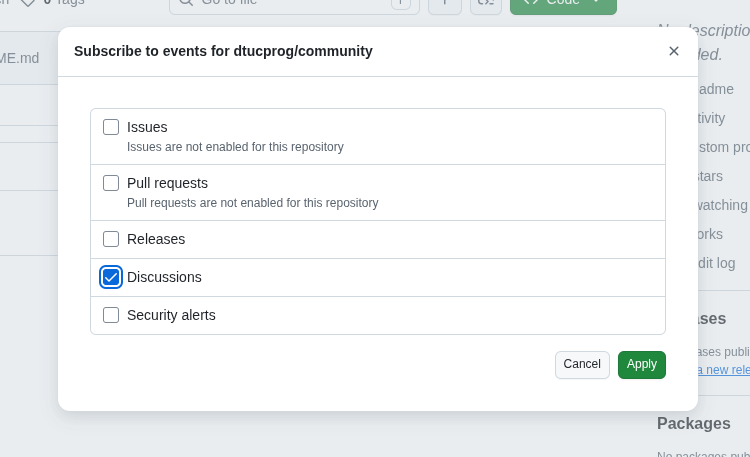
To be notified of new discussions, activate notifications for Discussions:
Go to the community repository
Click
 Watch button on the top right of the page and then Custom: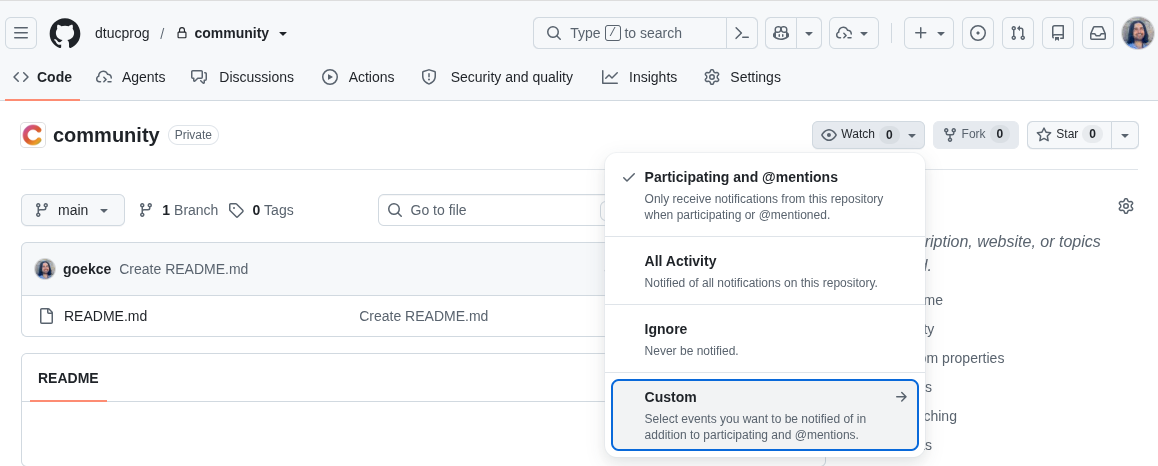
Tick the checkbox Discussions and click Apply.
Python intro
Do the interactive notebook Chapter 1: Programming as a way of thinkingfrom https://allendowney.github.io/ThinkPython/index.html. It is based on Google Colab notebooks.
Going through logistics
Go through 🗺️ Logistics and write down any doubts. In the class, I would like to focus on your doubts instead of going through every detail.
DTU address is required for:
applying for a GitHub Pro account, which we will use later in the course
joining the GitHub organization we will use.
If you already have a GitHub account, I recommend opening a new account with your DTU address to separate your private data.
Alternatively can you also send me an email. But then please include your course number and a recent photo, if you don’t have on Outlook.
I will use this info for class activities.