Welcome 🤗! In the next ~4h we will cover:
Let us use our fresh minds for learning instead of all the 🗺️ Logistics. We will right now only cover Breaks, the general goal, 📊 Live poll right now. We will cover logistics gradually today and next weeks.
Before we begin with the class, we need two Feedback persons.

“Welcome” by TheMuuj, CC BY-SA 2.0
Chat
Use chat in study mode
I encourage you to use the chat – but in a way which supports your learning: You should do the thinking and the chat should guide you through the process. To achieve this, you can use the following instructions:
On the chat prompt write @study or @lær på dansk:
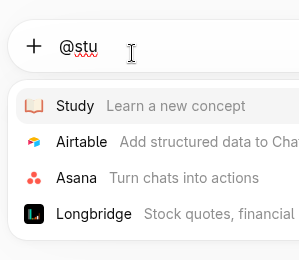
Claude has a skill called learn. To activate it:
Click ➕ icon on the chat prompt.
Click
Skills.Click
Browse-skills.Search for
learnand click on ➕. The ➕ will turn to a ⚙️ icon.Close the skills window. Now the skill will be available when you type
/Type
/and selectlearn.
Our university has a license.
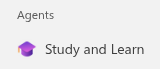
Copilot has a Study and Learn Agent.
On the left bar, click on the Study and Learn agent:
Click ➕ icon on the chat prompt.
Vælge
Studietilstand.
Claude’s learn skill is free to use.
Unfortunately it is not available on Claude’s official skill repository. Here is a copy: learn
-skill -by -anthropic .md. Alternatively you can copy paste the skill from Claude by finding the skill as described on the Claudetab.Create an agent that uses this skill as a system prompt or include the skill as a file.
Now paste the exercise you need help with or your question. For example Claude replies as follows:
This looks like a course exercise, so rather than just handing you a finished flowchart, let’s build your ability to construct one — that’s what you’ll need on the exam too.
First, a quick check: have you drawn flowcharts before ...
If you would like to explore more about AI & education:
Prompts for learning by Northwestern University.
100 chats for college students by OpenAI.
Husk kildeangivelsen ved brug af generativ AI i dine afleveringer og projekt.
Overtrædelse af ovenstående regler gælder som eksamenssnyd.
E: Chat in study mode
Flowchart
translate a process into a flowchart
E: Describing a process
Flowchart can also be used for describing a process.
Flowchart shapes
Meanings of shapes
Name | Shape | Example |
|---|---|---|
process | ||
flowline | ||
decision | ||
input/output | ||
terminal |
Translating an example process
Ask your guest how many sugars they want in their coffee, then add that many spoonfuls of sugar.
Lazy 🦥:
Better, by breaking down the process into steps, which can be processed individually 🤓:
Best, using real data, e.g., numbers in variables to represent the problem 💪:
Drawing Tools
Pen & paper ― it is ok if you take a photo and upload or use a tablet.
Declarative app: Mermaid. Select
Flowchartfrom the sample diagrams.[2]I use Mermaid for the diagrams you see here. If you are new to coding, it may be overwhelming.
E: Hello flowchart
E: Hello flowchart quiz
Repository
Explain why we use repositories
Upload your work to a repository
Accept and submit an assignment using Classroom 50 and GitHub
Delete a file on GitHub
See autograder results
E: GitHub support
E: Why repositories?
Why do we use repositories?
Keeping a history of changes is helpful if we or someone else who also work in the project would like to understand changes in the project which is useful for collaboration. Keeping a history helps also to roll changes back if something does not work as intended.
Keeping projects in a repository is also helpful to collaborate and share code. You share your photos on a social image sharing platform like Instagram, and the programmers use a forge to share code and follow other software projects — for example GitHub has a feed, where you can get updates about your followed people or projects. We will use GitHub[4].
Another important advantage: pushing your code to a forge will keep a backup of your project in the cloud.
I also keep my projects on repositories, including my lectures.
Last but not least, many companies ask applicants to include a forge link in their applications.
In this course you will submit your assignments for feedback mainly by submitting a repository.
E: First submission
E: Autograde feedback
The assignments will have an autograde program which gives you and us feedback about your submission about e.g.,:
Did you submit all required files?
Did you answer correctly to the multiple choice questions?
Does your program output
helloifhiis input? (when we start writing code)
E: Deleting a file on GitHub
E: Hello Classroom 50
Classroom 50 uses GitHub repositories for managing assignments. It gives you an overview of your assignments: deadlines, your submission status etc.
Classroom 50 gives a nicer overview compared to GitHub.
E: Reflection
We will usually end the day with this activity.
🎊 Congratulations on the first day! 🎊
After coding the diagram, you can export it as an SVG or PNG file, or paste its contents to an
*.mdfile and upload it to GitHub. GitHub can render it.If you see
this kindof formatting, then it is usually part of code, e.g., a variable name, an output message, etc.Other popular forges are GitLab, or Codeberg. GitHub is the most popular one and on which most of the open source projects in the world are organized. GitLab is popular among companies, because GitLab is open-source and can be installed in a private data center. Codeberg is organized by a European non-profit organization and is privacy-focused.